

Case Studies
A closer look at two of our documentation engagements. Both cover more than the writing: the publishing pipeline, diagrams, and, where it matters, getting documentation live on the customer's own support platform.
Tinx documentation

Tinx is a global Microsoft ISV and delivers apps for Business Central to connect any system to Business Central, for example, Amazon, Shopify, Magento, and WooCommerce.
View Tinx's Online Help
Used by more than 300 companies worldwide
Troubleshooting became the top priority from day one
Republishing an entire updated set of articles typically takes less than 10 minutes
Challenge
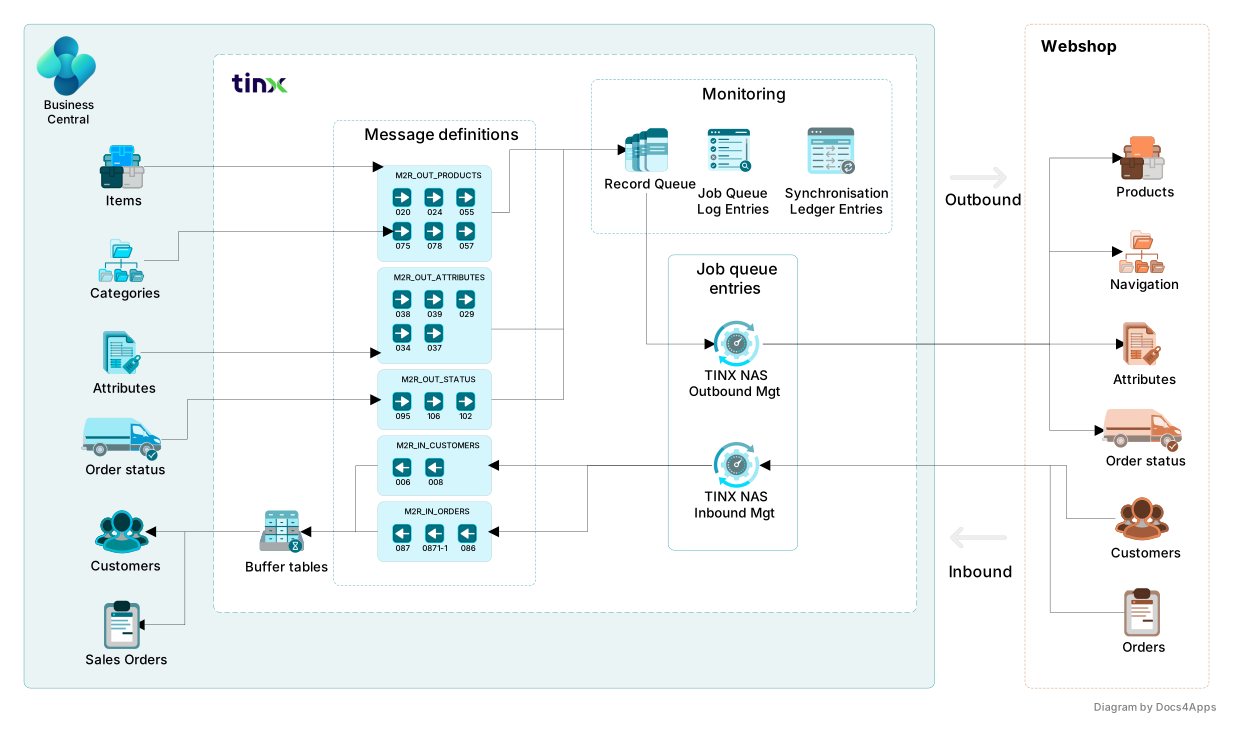
Tinx apps are used by more than 300 companies worldwide, selling everything from fashion and food and beverage to automotive parts, pet supplies, and personal care products through their own webshops. Normally, Tinx apps are invisible to the users: they're the bridge that keeps Business Central and a webshop like Shopify or Amazon in sync. Two moments break that invisibility. One is when synchronization stops working, for example when webshop orders stop importing into Business Central. The other is configuration changes, usually made by experienced users who understand the data structure on both the Business Central side and the webshop side.
Tinx's previous help center was a working support library, built article by article over several years. However, the documentation needed a new structure, because customers found it hard to locate the right article. It was also hard to read for new users who didn't know the product yet: most existing articles assumed an advanced reader. Many articles were outdated or incomplete and didn't cover all the options added to the product over time. Tinx offers extensive functionality, and many customers never used much of it. Each e-commerce platform also needed its own setup guide, on top of the core functionality shared by all of them.
Approach
We worked in close collaboration with Tinx's head of support, CEO, and COO. We also had access to Tinx's service desk in Zendesk, so we could research the questions customers actually asked. Together with the source material, the tickets helped us prioritize and structure the documentation set. The tickets showed a clear pattern: most questions weren't about how to use a feature, they were about synchronization breaking down. That changed how we started the project. Troubleshooting became the top priority from day one, not something added once the core functionality was documented.
Getting new users started was the second priority. Tinx apps install from AppSource. Then you import the default mapping, which provides much of the configuration. However, the apps still need setup before they run reliably. We built a quickstart that lets a new user complete the initial setup and run a real test, sending and importing data between Business Central and the webshop. The customer can test well-configured Tinx apps in action. Then we gradually updated all the existing content. We wrote new articles based on the old ones, the way we were learning the product ourselves, and explained everything that may not be obvious to a new Tinx user. Tinx apps are very technical products, and AI was a big help in that learning phase: to understand how they work, troubleshoot setup issues, and set up test scenarios.
Many articles in the existing help center were written earlier by Tinx consultants. We updated and expanded them, and added substantial information the earlier versions didn't include. We also delivered a style guide for Tinx consultants writing new articles. Work runs in sprints. Before Tinx's consultants review any new content, it goes through a rigorous internal check to verify its accuracy. That check combines numerous AI-assisted tests that verify accuracy from very different angles with manual tests, in which we follow the written procedures in Business Central. As a result, Tinx's consultants find almost no errors when they complete their final verification before publishing.
Publishing and infrastructure
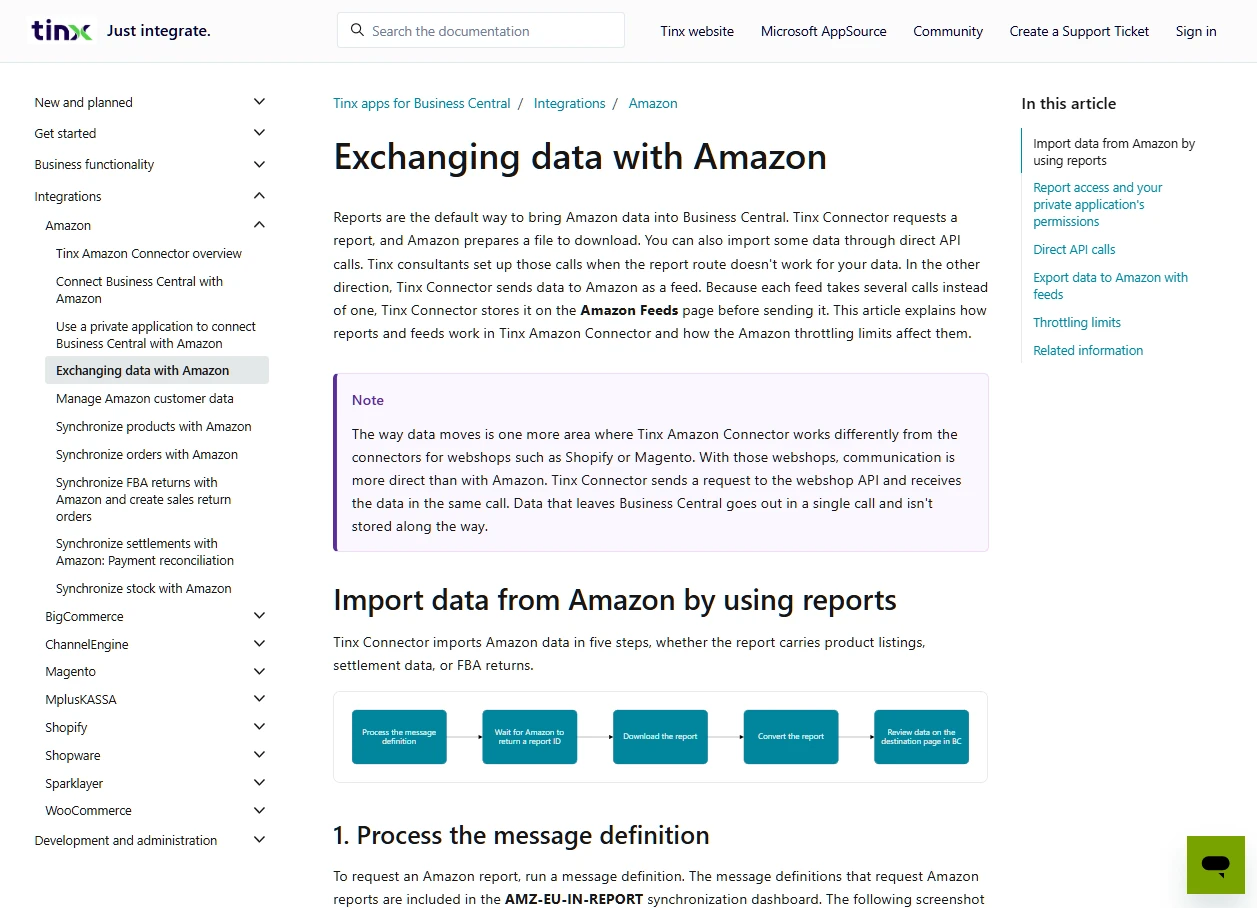
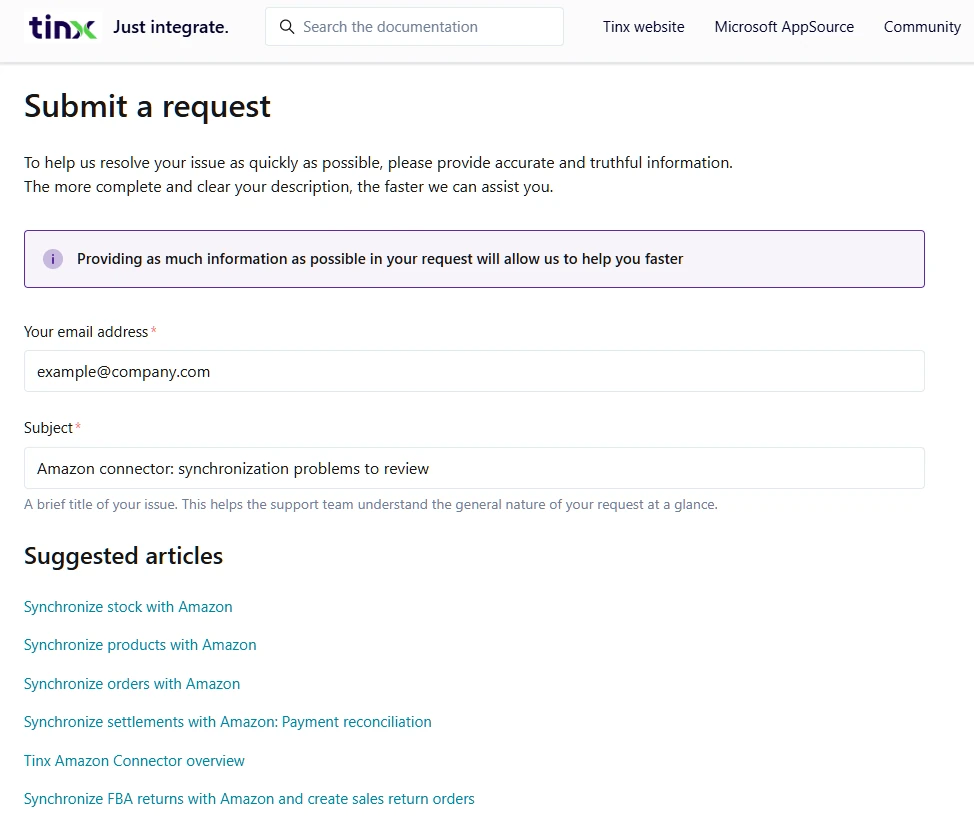
Tinx decided to keep documentation and support on a single platform, Zendesk. Compared to the flexibility of DocFX, Zendesk had limitations we needed to overcome. Its default navigation has three fixed levels, while Business Central's own documentation adjusts the number of levels to each article. Its default layout was also far from the layout users know from Microsoft's documentation, so we adjusted it to look closer to Microsoft Learn. On the other hand, the advantage was clear: with documentation and support on one platform, customers who submit a support request see suggested articles, and an AI assistant can answer from the documentation while its conversations are tracked in the support system, so the documentation can be improved later.
Articles are written in Markdown and kept under version control in a Git repository on GitHub. DocFX publishes them to a review site, where Tinx reviews the articles before they go live in Tinx's Zendesk Help Center. The publishing automation makes it possible to change a large number of articles at once, publish them live, and run an initial check of the updated articles, all in less than 10 minutes. Links and screenshots are checked automatically along the way.
Outcome
Today, the updated documentation gives at least two to three times as much information on each topic as before, so the articles cover their topics comprehensively. There's also much more content that's easier for new users to understand, and many more step-by-step instructions. Customers now get detailed procedures for completing specific tasks in Business Central, not only general overviews of each feature. Many features that weren't documented before are now described. For example, some integrations had no documentation at all. Now both users and potential customers can learn about them.
Customers can now solve synchronization problems on their own, with a six-step troubleshooting checklist and a searchable error-message reference that gives the cause and the fix for the most common errors. Many platform setups run from the first step to a successful test, and new users start with a first-steps path that didn't exist before. Each article covers the full feature, not just one way to use it: the price and stock synchronization articles, for example, explain every method Tinx apps support and when to choose each one, with worked examples.
Field names, page names, and screenshots were updated to match the current version of Tinx apps, and every article is checked against how they work today. The articles follow the Microsoft Writing Style Guide and Business Central's own documentation conventions. Users who already know Microsoft's own Business Central documentation find a familiar environment, where information is easy to find and understand.
In parallel with the documentation project, Tinx's support team launched an AI assistant that answers questions from the documentation. It can send users to the right article or to support, in an experience similar to Copilot in Business Central. AI answers became more accurate and more instructive, both in Copilot in Business Central and in the Zendesk AI chat.
Some areas still have room for improvement. In some articles originally written by Tinx consultants, we've so far improved only the wording. They still need further work to make the content clearer for end users, to add missing information, or to apply the Microsoft Writing Style Guide.
SkyBill documentation

SkyBill is a meter-to-cash utility billing platform built on Business Central. Utility and property management companies use it to handle metering, tariffs, and invoicing.
View SkyBill's published documentationPassword protected. SkyBill's documentation is available to its customers and partners. If you don't have access, contact SkyBill at info@skybill.eu.

v2.18 and v3 documented side by side throughout the migration
Every article checked against SkyBill's own source material before publishing
Led to a new documentation project for one of SkyBill's own customers
Challenge
SkyBill's customers include heat, water, and electricity network operators, as well as property managers who bill tenants on behalf of landlords. All of them run meter-to-cash billing at scale. SkyBill needed complete, structured end-user documentation that answers customers' questions directly, so they don't have to contact the support team each time. We started with SkyBill v2.18, the version most customers were running. Partway through the engagement, SkyBill began rolling out v3. It was the third major overhaul in the product's 15-year history. Customers move to v3 gradually, company by company, and v2.18 stays fully supported until they do. The differences between v2.18 and v3 are significant, so we wrote two separate documentation sets, one for each version.
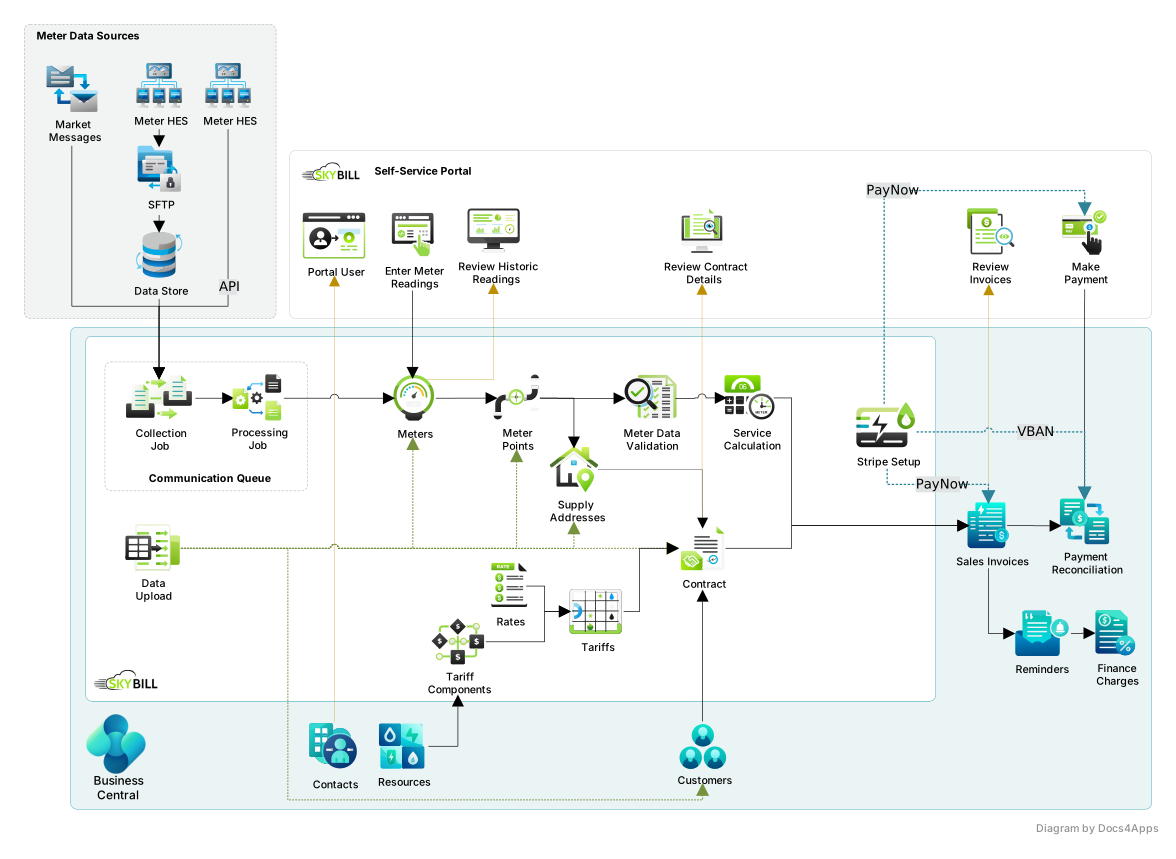
SkyBill customers rarely think of Business Central and SkyBill as separate entities. SkyBill reaches into many standard areas of Business Central and changes the way they work. Invoicing extends into SkyBill-specific billing segments. Resources link SkyBill's invoicing to Business Central's financial management. Contacts and customers connect to supply addresses and utility contracts. This broad reach makes linking to the standard Business Central documentation challenging, for two reasons. First, users aren't always aware of what's standard Business Central and what SkyBill adds on top of it. Second, whenever the Business Central documentation describes a process that SkyBill changes, even slightly, the documentation has to warn users about the difference.
Approach
SkyBill's CTO, the product's main architect, played a key role in the documentation, along with several SkyBill consultants and developers; they provided information on how the current functionality works.
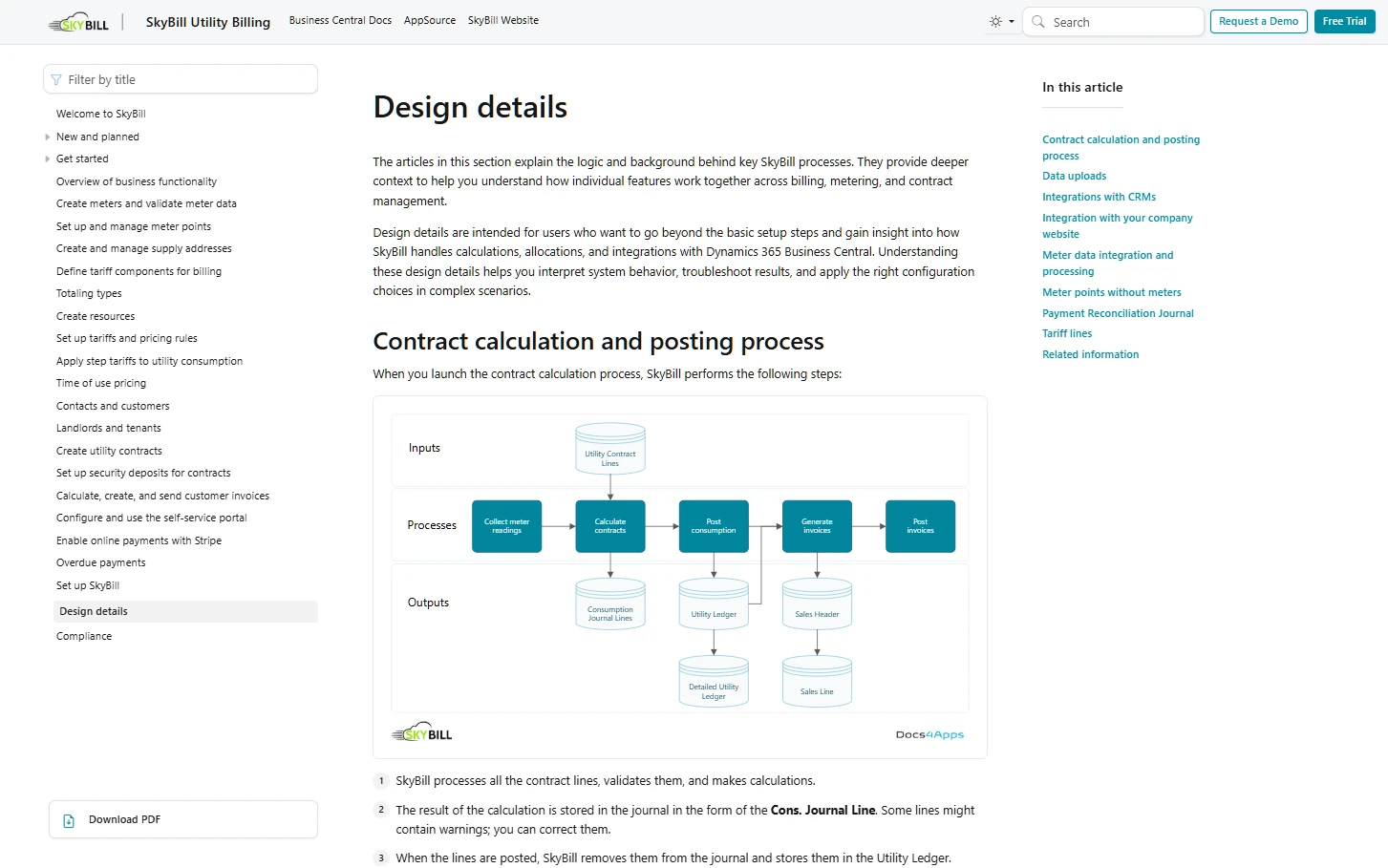
We built the documentation set from scratch, combining several content types. Conceptual articles explain how SkyBill's billing logic works: what a tariff component is, how time-of-use pricing behaves, what a billing period tracks. How-to guides walk through procedures for tasks like creating a meter, setting up a utility contract, applying step tariffs, and configuring a customer portal. The set also covers setting up SkyBill and design details that explain how its processes work. We also produced diagrams that explain data flows and business logic where text alone wasn't enough.
Adding each link to the Business Central documentation required careful verification, because SkyBill changes standard behavior, so a Microsoft Learn article doesn't fully describe what happens inside SkyBill. Because SkyBill touches many areas of standard functionality, we applied this caution broadly. On the other hand, much of the introductory material in Microsoft's Business Central documentation, written for new Business Central users, proved very useful for new SkyBill users as well, so we used that content as training material.
Every article went through a multi-stage verification that combined AI checks with manual review: structural consistency, terminology, tone and style, sentence-level readability, and a check against SkyBill's own source material. During the v3 migration, we ran the same checks on the new content, then did a final read-through of the full article set before sending it to SkyBill for review. Together, these steps kept the content highly accurate.
Publishing and infrastructure
We write the documentation in Markdown, build it with DocFX, and publish it through a GitHub-based pipeline, tracking every change. Diagrams are kept as editable source files next to their published versions.
Outcome
SkyBill already had documentation, but the company wanted to take its customer support to a higher level. One of the biggest improvements is that we rewrote the documentation from scratch, so it reflects the product's current functionality and keeps pace with its rapid evolution. The new set adds complete procedures, concept explanations, and content for users who are new to the product.
Each procedure now states the prerequisites, provides one action per step, explains what happens next, and shows how to check the result. The set covers everyday tasks, such as creating a meter, applying step tariffs, sending invoices, setting up a customer portal, and reconciling a payment. First-steps content helps new users find their way before they do anything else. Exceptions that could affect a whole billing run are explained on the step where they matter.
SkyBill concepts are explained with real-life examples from the utility industry, so customers understand each option before choosing the one that best fits their business. The articles follow the Microsoft Writing Style Guide and Business Central's terminology, with short sentences and one term for each concept. Users familiar with Microsoft's Business Central documentation find a familiar environment where information is easy to find and understand.
Standard processes link to Microsoft Learn, and SkyBill's documentation covers only what SkyBill changes, so nothing goes out of date when Microsoft updates its own documentation. v2.18 and v3 have their own sections, and new v3 concepts are explained in terms v2.18 customers already know.
The engagement grew from the initial project to documentation for SkyBill's v3 migration, then to a project for one of SkyBill's customers.